News
News collects market headlines and upcoming events in one place.
Where to find it: left menu → MARKET → News.
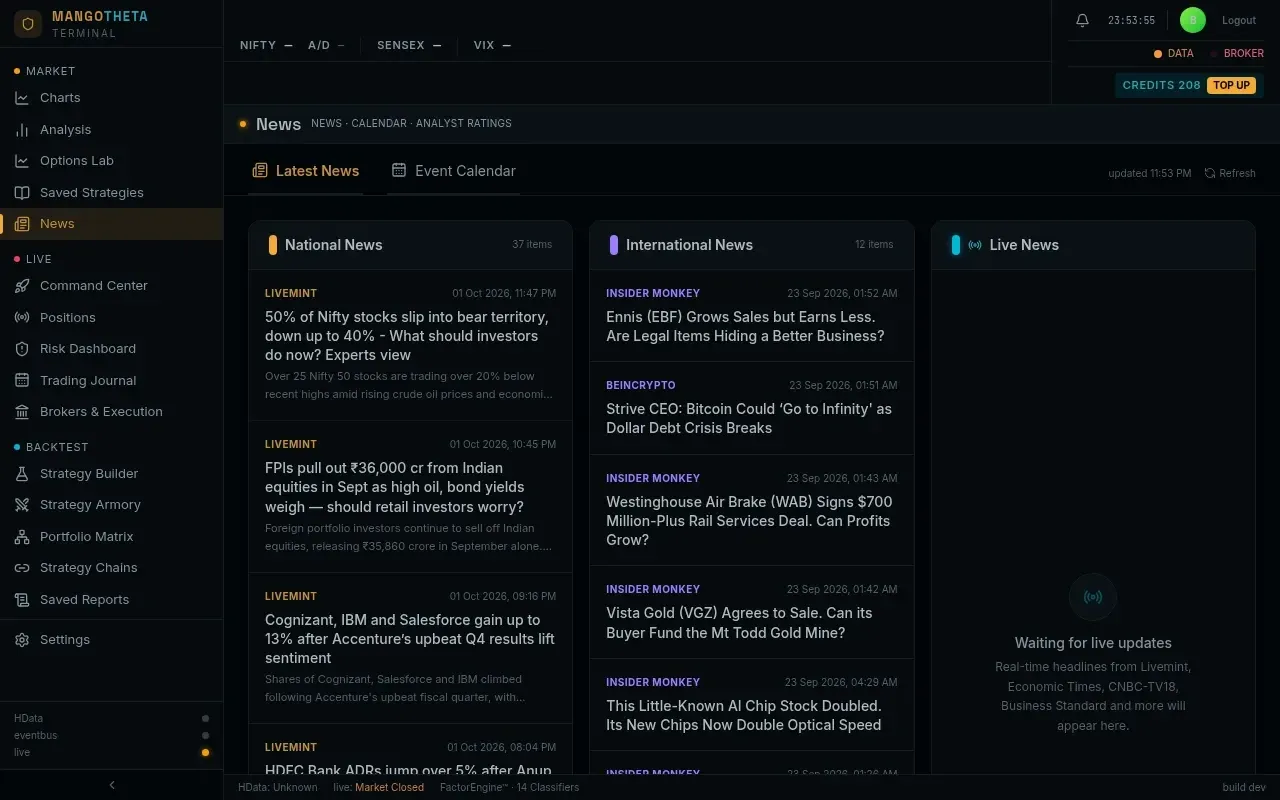
The page has two tabs: Latest News and Event Calendar. At the top right:
- updated hh:mm shows when the page last fetched news.
- Refresh fetches again now. The page also refreshes by itself every 3 minutes while it is open.
Latest News
Section titled “Latest News”Three columns:
| Column | What it shows |
|---|---|
| National News | Indian market headlines. Each shows the source, the time, the headline and a short summary. |
| International News | Global market headlines, in the same form. |
| Live News | Fast headlines from Indian financial news channels as they arrive. Until one arrives it says Waiting for live updates. |
Click a headline to open the full story on the publisher’s website, in a new tab.
Headlines about F&O expiry are left out on purpose; expiry dates are shown on the trading pages instead.
Example: at 10:40 a headline appears under National News: the source, 10:38, the headline and two lines of summary. You want the detail before deciding whether it matters for your NIFTY position: click it, and the full story opens in a new tab. The News page stays open behind it.
Event Calendar
Section titled “Event Calendar”| Column | What it shows |
|---|---|
| NSE Corporate Actions | Upcoming earnings, dividends and other corporate actions, each with its date, type and impact (High or not). |
| Macro & Policy | Economic and policy events, and index rebalancing, with the region (India, US, …). Their dates are marked estimated. The app puts each event on a fixed day of the month, not on the official schedule: the RBI policy committee and the US Fed do not meet every month. Check the official calendar before you rely on a date. |
| Deep AI Impact Analysis | Shows the result after you click Predict or AI Analysis on an event. |
Predict and AI Analysis
Section titled “Predict and AI Analysis”Click Predict (on a corporate action) or AI Analysis (on a macro event). While it works, the panel on the right says Gathering Deep Context…. The app gives an AI model the event and the six latest market headlines (general news, not a search about that event). The model writes a short report under Target Event (the event you clicked): Sentiment, Volatility Risk, AI Summary, and when available Expected IV Impact, Expected Move Range, Actual Outcome (for past events), Global Impact, India Impact, Historical Precedent, FII/DII Positioning and Affected Sectors. Sometimes it adds a box headed Quantitative Strategy Recommendation.
Example: a company’s quarterly results are listed under NSE Corporate Actions for Thursday, marked High impact. Click Predict. When it finishes, the right panel shows the event, a Sentiment (for example Neutral), a Volatility Risk (for example High), and a few lines of summary. Treat it as a starting point for your own research, not as a forecast.